
ARTWORK SPECIFICATIONS
These simple guidelines help us get the best print results for your custom sublimated apparel. Following them helps your colours stay sharp and consistent.

Vector Artwork
Vector files are built with smooth lines and shapes. The great benefit is that you can resize them freely, and they will stay crisp. This works perfectly for logos, text and graphic shapes on cycling and running wear.
✅ Formats we work well with: .ai, .eps, editable .pdf
✅ Suggested design tools: Adobe Illustrator, CorelDRAW, Inkscape
Helpful tip: We recommend converting all fonts to outlines before sending files. If you use another brand's logo, it's best to get their original vector file directly.
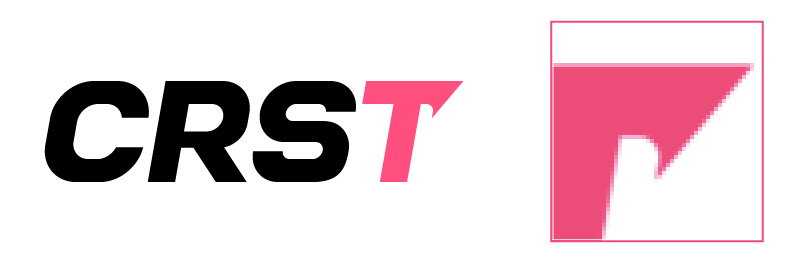
Raster Artwork (Bitmap)
Raster images are made up of many tiny colour dots, called pixels. They look clear at their original size. When stretched larger, edges can turn blurry or jagged. PSD, JPG and PNG are common raster file types.
Raster files are ideal for photos, soft colour gradients or textures that cannot be drawn as vector art. If you plan to send raster artwork, it will look best when it meets our size and resolution notes below. We cannot guarantee crisp prints if your file is low‑resolution and needs to be scaled up.
Which file should you send?
Vector files are our preferred choice.
Is my PDF a vector file?
A PDF can be either vector or raster. If your PDF contains editable shapes and text, it works as vector artwork. If it only holds an embedded picture, it counts as raster artwork instead. If you are unsure, feel free to reach out via WhatsApp or email: amytong@tarstone.com for a quick check.
Working with Photoshop (.PSD) files
We can work with PSD files nicely when these points are covered:
● Canvas set to 100% of the final print size on the garment
● Resolution at least 150 DPI
● Design placed on a transparent background, with no white box around your artwork
Even when your PSD meets these points, we generally don’t recommend building full garment layouts in Photoshop. Raster files limit our flexibility to adjust designs for different garment sizes and cuts.
JPEG / GIF / PNG / TIFF files
JPEG and GIF are not the best fit for production printing. They compress image details and tend to lose clarity when resized, which also makes editing harder for our team.
PNG and TIFF can work well when these requirements are met:
● Created at 100% of your final print size
● Minimum resolution: 150 DPI
● Transparent background, with no extra white border around your design
Please keep in mind: raster files are less flexible for edits. The final print will match exactly what you see on your screen. You can reach out anytime if you'd like us to review your file before ordering.
Copyright & Trademark Notice
Please make sure you hold permission to print any third‑party logos or copyrighted artwork. When you submit files, you confirm you have the rights to use these designs. You will take responsibility for the artwork you share with us.
Colour Selection for Custom Sublimated Apparel
Use our colour chart to pick colours for your apparel. All screens display colours differently. The shade you see on your monitor may not perfectly match the finished fabric. Colours outside our standard palette have a higher chance of shifting after sublimation.
Feel free to ask us for physical fabric swatches. Let us know ahead if you need precise Pantone colour matching.
Alternatively, you may send files by email: amytong@tarstone.com